
Task View
Task View presents an inventory of workspaces and window families.
Current beta & runtime boundary
At snapshot 6e6ad828c (2026-11-02 canonical ledger), 19 of 242 whole EARS requirements and 42 of 417 scenarios hold historical source-bound acceptance (ELM-TEA-001, ELM-TEA-002, and ELM-DEL-010, alongside published a327c8f7f Store and 6e6ad828c persistent custody CPU checks). The embedded desktop specimen below runs in-browser over deterministic fixtures, and captures in Evidence come from the frozen bc3daf7b reference baseline. Native Omarchy/Hyprland GUI, provider cleanup, AT/IME, hardware latency, and release acceptance for this surface remain OPEN.
Overview
Task View presents an inventory of workspaces and window families.
Anatomy
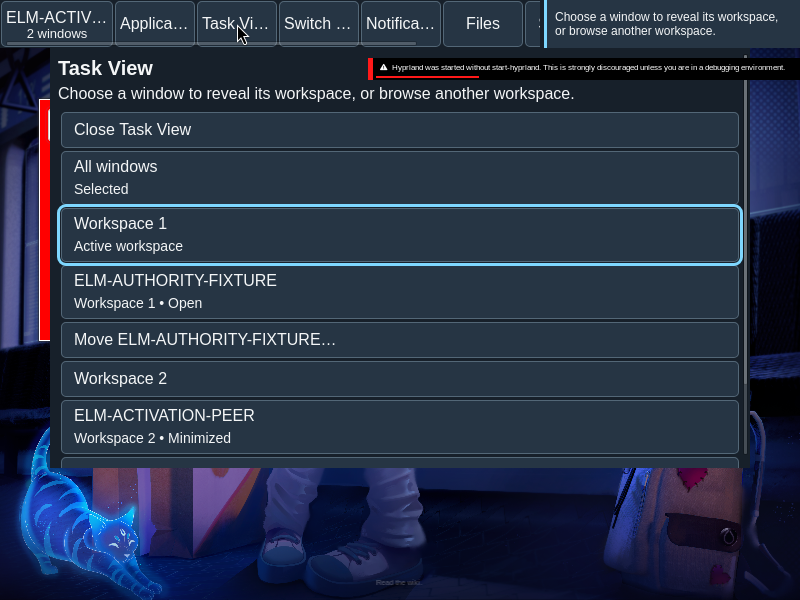
A flat sequence contains Close, All windows, workspace filters, family rows and applicable move, navigation and recovery controls.
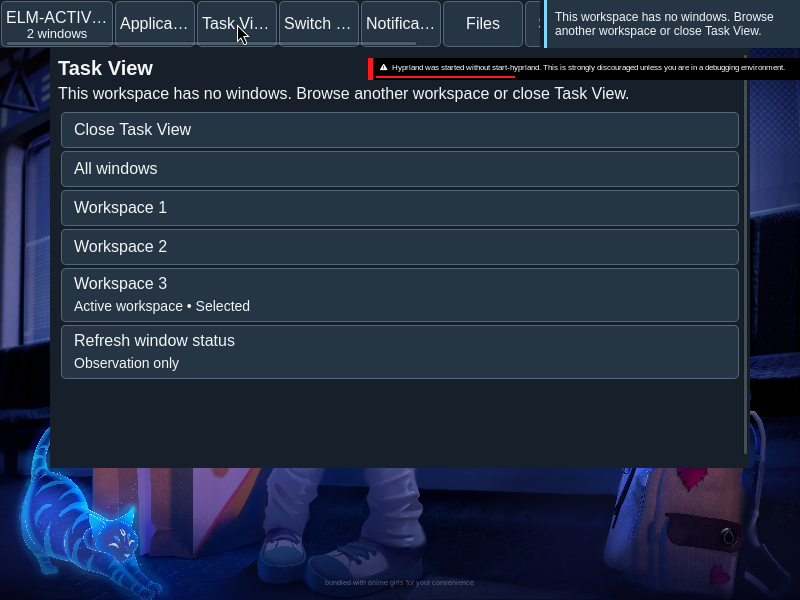
Workspace filters and family rows are ordered controls. An empty inactive workspace can expose a Go action; eligible families have a separate Move action. These controls are not draggable columns.
States
A selected filter and the observed active workspace are independent facts. Empty workspaces remain visible.
- All windows: the inventory spans workspaces.
- Workspace filter: only that workspace’s inventory is browsed.
- Active workspace: an observed desktop fact, independent of the selected filter.
- Empty workspace: remains visible and can offer Go when eligible.
Specimen
Real Elm interface. Simulated desktop. Client window interiors are fixtures. Load the desktop only when you want to explore this component.
Behavior
Filtering changes the inventory, not the desktop. A family activates or restores; an eligible empty inactive workspace has a separate Go action. Move opens destination selection.
Select a filter to browse without changing the desktop. Select a family to reveal its workspace and activate or restore it. Go navigates to an eligible empty workspace; Move starts the separate destination flow.
Accessibility
Buttons retain their source order and names. Selected filters expose pressed state, and labels wrap at enlarged text sizes.
Content
Describe the active workspace as an observed fact. Do not imply workspace columns, thumbnails or drag operations.
Use the workspace identity in each filter and destination label. An empty inventory is not an error and should not be described as a missing workspace.
Evidence
Unmodified captures of the running interface record the states below.
Try it
Explore task view in context on the simulated desktop.