
Snap layouts
Snap layouts offer six placements for an eligible window.
Current beta & runtime boundary
At snapshot 6e6ad828c (2026-11-02 canonical ledger), 19 of 242 whole EARS requirements and 42 of 417 scenarios hold historical source-bound acceptance (ELM-TEA-001, ELM-TEA-002, and ELM-DEL-010, alongside published a327c8f7f Store and 6e6ad828c persistent custody CPU checks). The embedded desktop specimen below runs in-browser over deterministic fixtures, and captures in Evidence come from the frozen bc3daf7b reference baseline. Native Omarchy/Hyprland GUI, provider cleanup, AT/IME, hardware latency, and release acceptance for this surface remain OPEN.
Overview
Snap layouts offer six placements for an eligible window.
Anatomy
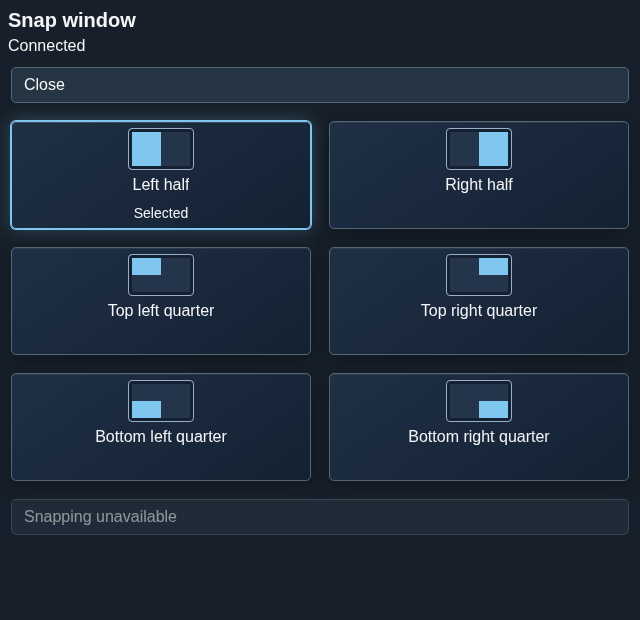
The chooser contains left and right halves and the top-left, top-right, bottom-left and bottom-right quarters, followed by Apply.
Six named region controls select a left or right half, or one of four quarters. Apply is a separate control after the choices; Close leaves the chooser.
States
Selection previews a proposed region. An unavailable geometry capability prevents applying a placement.
- Unselected: no proposed region is chosen.
- Selected: a region is proposed, but the window has not moved.
- Unavailable: current geometry or capability does not admit Apply.
- Applied: a fresh window observation confirms placement.
Specimen
Real Elm interface. Simulated desktop. Client window interiors are fixtures. Load the desktop only when you want to explore this component.
Behavior
Select a region, then choose Apply. Placement depends on current window eligibility, work area and generation-bound geometry; selecting alone does not move the window.
Choose one of the six named regions and then activate Apply. The proposal binds the current monitor, work area and workspace generation; changed facts require a fresh valid proposal.
Accessibility
Each choice has a text name and keyboard access; selected state is distinct from focus and from an applied placement.
Content
Name the half or quarter explicitly and communicate unavailable geometry without suggesting it was applied.
Use “top-left quarter” or another explicit region name. Describe unavailable geometry as unavailable, not as a selected or completed snap.
Evidence
Unmodified captures of the running interface record the states below.
Try it
Explore snap layouts in context on the simulated desktop.